Adding Featured Images

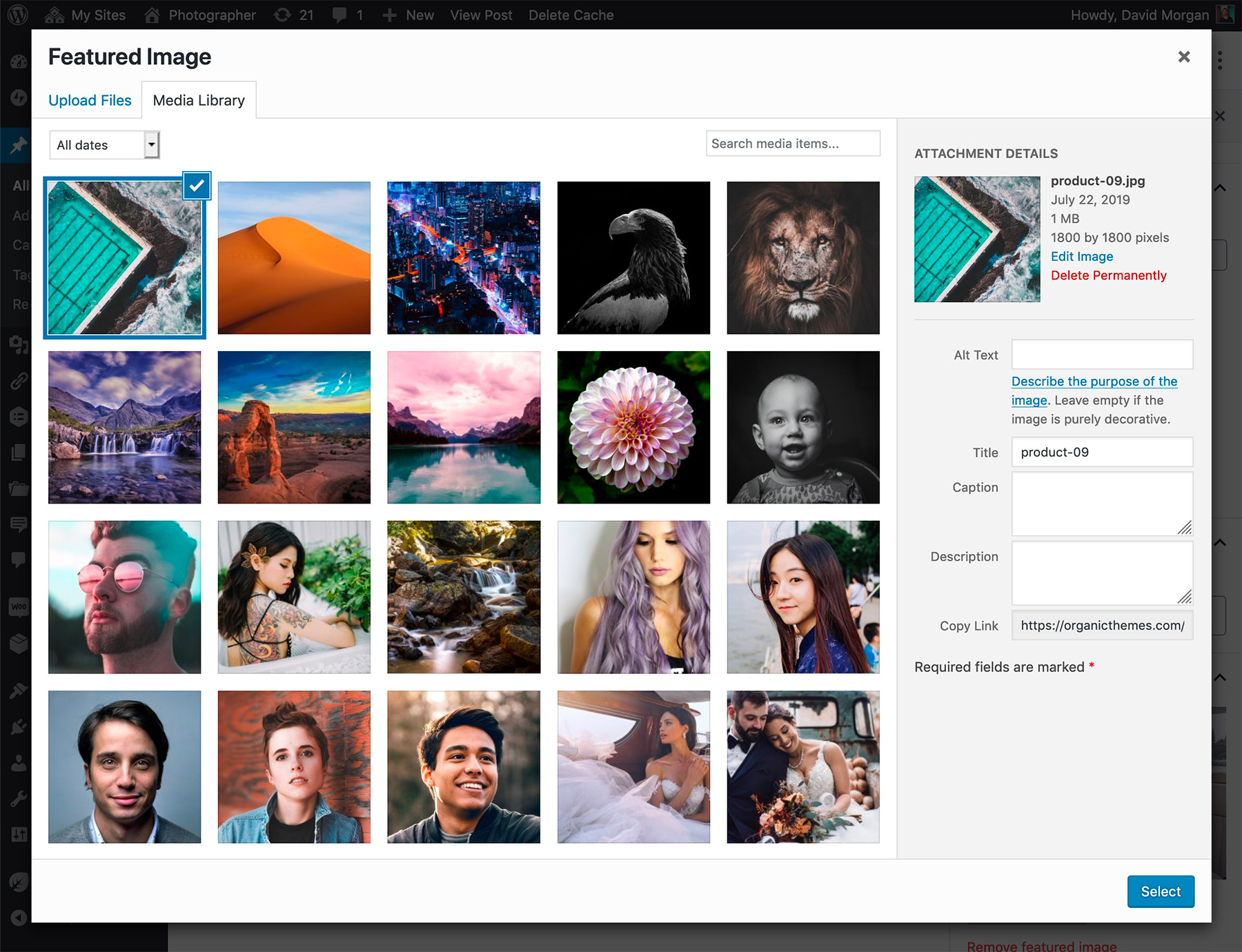
After uploading your image, select the option to "Use as featured image".

All of Organic Themes use the WordPress Featured Image functionality to display thumbnails within our themes. We have provided instructions for adding Featured Images.

  1. Within the Post or Page Editor of the WordPress admin, scroll down to the “Featured Image” section in the right column. If for some reason it’s not visible, make sure you have “Featured Images” checked within your WordPress Screen Options.
  2. Choose the “Set Featured Image” option, and the typical WordPress media overlay will pop up.
  3. Upload an image from your computer.
  4. Once an image is uploaded, select the option to “Use as featured image” from the bottom of the image settings.
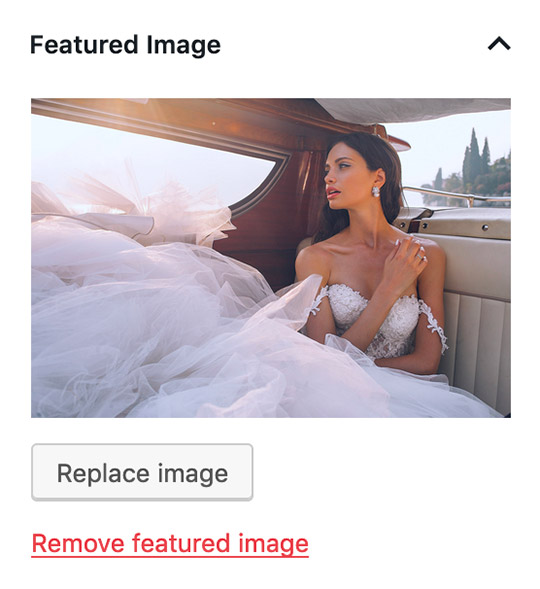
  5. Your post should look similar to the example image when a featured image is added correctly. The images will automatically scale to fit the desired section.

Note: Featured Images are automatically cropped to fit their locations in the theme. Images are cropped towards the middle. As a result, this may give an undesirable effect if the focus on the image is not in the center. For ideal results, it’s recommended that images are cropped to size before hand. The sizes of Featured Images are defined in the functions.php file of the theme.

128 Comments on “Adding Featured Images

  1.  by  KIB

    It might be useful to point out that Organic Themes (Structure and Portfolio, anyway) use Featured Images as Thumbnails in Category, Tag and other lists of posts. Many of my first questions on the OT Forum were about trying to get Thumbnails to appear because I didn’t realize the importance of Featured Images.

    Thanks and keep up the good work, Organicators :)

  2.  by  lori burke

    Hi There, I’m using Structure to build a blog for a startup nonprofit. I am a novice at this and can’t seem to get a featured image to work no matter how much I am following the instructions. Any advice? Thank you!

    •  by  david

      Hi Lori,

      It appears you are using the free version of the Structure Theme on WordPress.com. Unfortunately we did not develop that version of the theme. WordPress simply used our theme design. We are unable to provide support for free versions of our themes. I recommend using the WordPress.com forums.

  3.  by  Darren

    Hello: I am working with the Portfolio Theme (first time WordPress user) and am having trouble uploading images to slider and also uploading images to be placed in the home page posts section on the home page. Any help? Please… Many thanks!

  4.  by  Dan

    Hi,

    I’ve purchased the portfolio theme and I’m using it for my site, but I can get the slider to appear on my homepage. I’ve set several featured images but they just don’t appear at all.

    How do I get the slider to appear?

    Many thanks!

  5.  by  chris

    Hi,

    I’ve got the same problem as Dan. I want to set up a slider on the homepage. There are hardly any options for
    this in theme options. Just Featured slider categories y and interval timer.

    I’m new to wordpress so maybe I’m missing something simple, but it doesn’t make sense to me.

    Can you please advise?

    Cheers

    C

    •  by  organic

      That sounds correct. There shouldn’t be too many options. Be sure to setup a category (like “featured”), then chose that category under “Featured Slider Category” in the options. Every post you make in the “featured” category will show up in the slider. Be sure to assign a featured image to each of those posts.

  6.  by  Courtny

    I’m having an issue getting the featured images option to work. When I use it with posts it works fine, but I want to assign a featured image to each of my pages. When I upload the images to my pages I do the same procedure as with posts, but it doesn’t work. Any suggestions?

    •  by  David

      Featured Images for pages are only currently available for some of our themes. Namely the Tech Theme, Studio Theme, NonProfit Theme, Portfolio Theme and Health and Beauty Theme at this time. Featured Images on pages are used to display a banner image for that particular page.

  7.  by  Annika

    Hi
    Does anyone know how I can get an image to appear on the top left side? Originally there was an image there, but I deleted it by missake, and now I would like to add my own foto. How do I do this?
    Thanks
    Annika

  8.  by  Maricar

    Is it possible to change the Homepage Slider into the Carousel type so that instead of the images sliding it transitions?

  9.  by  Kac

    hi,

    can you help me with this issue please?

    i added about 50 images as posts to have huge slideshow on Portfolio Theme’s homepage but there is only last 10 displayed. How can I change this to have all of 50 in slideshow?

    thx, kac

    •  by  David

      You can currently adjust the amount of slides displayed in the Reading settings.

  10.  by  Kac

    .David! thank you! i forghot this option.. Once more thank You!

    have a amazing day!
    kac

  11.  by  Davy

    I’m trying to get the Portfolio theme slider to work. But if the image is big enough to fill the slider then it won’t fit post. and vice versa. How do I have a different size for slider and post?

    •  by  David

      Featured Images are not added to the post. You can save the same image at a smaller size to fit the post.

  12.  by  Kevin Whilden

    I am trying to use the Portfolio Page 3 column to the following page on my test site:

    http://gstest.sustainablesurf.org/eco-boards/gallery-of-eco-boards/

    to create a gallery of Eco Boards from images are posted to the Ecoboards Custom Post Type in our admin.

    I have in the Organic Themes settings, have the Categories set to ‘Ecoboards’ and the number of posts to 27.

    Now, how to have the Category automatically assigned to each Ecoboards CPT posted???

    I have seen some code in wp forums searches to functions.php to do this, but it did not work. It seems it should be fairly easy, but have not figured it out.

    I simply wish for the category to be auto assigned, so that every featured image (or first post image) in posts for Ecoboards shows up within this gallery page in the 3 column page template. As I understand it, if the Category is assigned, they will then show up in this page template in the number set & that clicking on the image then in the gallery template would bring a visitor to its respective post.

    How to do? Is this correct how the 3 column gallery would work?

    Thx for the help.

  13.  by  MLC-WSP

    Hi there,

    We recently upgraded to the latest version of the non-profit theme. Since then we’ve been having a problem getting the tabbed sections and the featured tabber and featured slider both working; the middle featured pages propagate the images attached to the featured pages properly, however. Also, When I try and select a category in the drop-down for both sections my only option is “all categories”. Any ideas? I’ve followed the directions above several times and cannot get them to work.

    Again, both areas worked as expected prior to the upgrade.

    Many thanks!

  14.  by  Bill

    The slider images seem to be cropping toward the left, rather than the middle. How do we correct that?

  15.  by  Gina Di Orio

    When I see your post example for the Structure Theme, there’s just text on your content and no images… My question is, can I put a diaporama in my post content, a video or other media ?

    Thanks for your answer,

    •  by  David

      Yes, you can add images, galleries, video, audio and more to the actual post content — all within the same post. The demo just displays dummy content all in text as a time saver when creating the demos.

  16.  by  Renae

    Hi!

    I am using the portfolio theme…I want my featured images to come from pages, not posts. When I go to edit the options for my homepage bottom…I only have the choice of my categories to chose from. Are the categories just for posts? I don’t have an option to add pages to categories.
    Thank you!!

  17.  by  Ana Maria

    Hello,

    I want to place a single static image on the homepage where the slider is currently active. I don’t want to remove the available functionality but for the time being, I don’t need it to scroll or even use images from my gallery featured thumbnails.

    I’ve set the slider to “hold” but it seems that I’d still need to create a regular post and “feature” the image so that it shows up in the slider area.

    The image I want to use cannot be in a blog post or thumbnail below….it needs to be totally independent and static.

    How do I do this without removing the slider code in php? I’d like to use that option later, just not yet.

    Thank you,
    Ana Maria

  18.  by  Gary

    How do I get the featured image to link to a larger image? I’m using this in a section called Past Event and would like to be able to click on the poster and enlarge it. Perhaps I’ll just insert into the post and see how that works?

  19.  by  Alex Rains Custom Furniture

    Hello,
    I am using the portfolio theme. I’m confused about the featured slider! If i change my homepage to a static page the featured slider disappears! The only way I seem to be able to display it is if I have the homepage set as a blog. How do I set it up as a static page with the featured slider?

    •  by  David

      If you wish to display the home page as seen in the theme demo, your WordPress Reading settings should be set to display your latest posts, not a static page. The default slider is only for the home page, and does not display on static pages. You could use a plugin such as Portfolio Slideshow (http://wordpress.org/extend/plugins/portfolio-slideshow/) for adding a slideshow to a static page.

      •  by  andrea

        I also have trouble with the themes’ slider showing. Tried in the past and just had to choose another theme but this time once again. Have all settings correct but just a blank area every time.

        I also get “Warning: Cannot modify header information – headers already sent by (output started at /home/andreao/public_html/twochicksandajewelrybiz/wp-includes/class.wp-styles.php:92) in /home/andreao/public_html/twochicksandajewelrybiz/wp-includes/pluggable.php on line 866″ every time I change something in admin.

      •  by  Rebecca Forbes

        I am getting so frustrated. I just want to get my website looking like the photography demo (but with my own images). I would think this would be simple and/or detailed here but it isn’t.

        If I set the Readings settings to display latest posts, it still doesn’t change the main image on the home page.

        Please, please, please give detailed instructions on exactly how to get the site to look like the demo! That’s why I bought it!

        Thanks,
        Rebecca

        •  by  Jeremy

          Hi Rebecca,

          Once you upload the demo content (Tools –> Import), you’ll need to navigate to Appearance –> Theme Options, and configure the various areas of the site to show particular categories. For example the slider would show the ‘slider’ category, a teaser section the ‘teaser’ category, etc.

          Thanks,

          Jeremy

  20.  by  Esteban

    Hello,
    I’m customizing the Portfolio Theme and I came across a problem that I can’t resolve. I added some text to the featured slider but for some reason it looks cropped. Out of 3 lines I can only see 1. Any ideas?
    Is there any other way I can create a text block under the feature slider? Thanks in advance.

    •  by  David

      You may need to increase the height of the slider/homepagetop within the stylesheet if you are customizing the size of the slider.

  21.  by  Kendall

    I am having trouble uploading any pictures from a file from my computer. I have only been able to successfully upload pictures from a website URL. When I upload from a file, It seems to work but the picture does not actually show. We are unable to upload our logo to the header. or to our middle bars because these photos need to be from a file from our computer. Let me know if you can help. Thanks!

    •  by  David

      This might be an issue with your WordPress installation. I would recommend re-installing WordPress.

  22.  by  Emma

    Hi, I am using the Natural Theme and I’m trying to get my featured slider and the teaser posts to work but I’m having trouble. I am putting them in to a category but when I go to Theme Options the category isn’t showing up. What am I doing wrong?
    Thanks so much!

  23.  by  Red

    Hi Organics,

    I’m just getting to grips with my new Bold Theme. I want to remove all 2 and 3 column featured posts from my homepage so I specified 0 in the “number of posts to display” for each field (in Theme Options), however they still seem to show up.

    Please help!

  24.  by  natalia

    I am triying to add the future image to my studio theme but it doesn’t fit in the space and the text that I trie to include is in white as mi back ground…this is not as simple as I expect..
    Thanks in advance for the help
    Natalia

  25.  by  bianca

    Hi there
    I would like to know what the dimensions of the photos for the natural theme – ie whatever is described in the functions.php file so that my featured image can be displayed correctly.
    Please help

  26.  by  tara

    hello

    my 3 featured images on my home screen are incorrectly cropped. i pre cropped all the images beforehand and they are showing up correctly on my projects page but not on the main page. anyone have any ideas?

    thanks in advance!

    •  by  David

      It seems you have made some adjustments to the slider size. I would recommend our support forums for guidance.

  27.  by  Jack

    Hello, I am using the studio template. On the sample one of the featured stories on the home page (about us) links directly to the About page. I don’t see any option for having these link to anything else but posts rather than pages.

    Thanks

  28.  by  Chris

    I am using the Business Theme and None of the Appearance Settings seem to be working, the featured image doesnt work either. We are trying to get the Slideshow to work. We have tried everything!

    •  by  Chris

      Additionally NONE of the Theme Options>Settings are saving.

      The Options Framework plugins is Activated. What’s the issue?

  29.  by  Elyse

    Can I add images to the slider that are not part of a post… ie an image to advertise an event or a link to a page with an image? Thanks!

  30.  by  Stephanie

    Hi,

    I am trying to get the slider to work but it’s driving me nuts! It’s there but it’s not scrolling, and the arrows are not in the bottom right corner.

    I have three posts, all under the category “Slideshow”, the theme options slider set to the correct category “slideshow”, and I have the option to have it on the home page turned on. All three posts have the images posted as the featured image, and all the posts have titles (not sure if that matters or not.

    Please help!

    •  by  David

      Make sure you add more than 1 published post to the slider and choose to display more than 1 post within the theme options.

  31.  by  Karla

    Hi,

    I’ve been playing around with the slider code and now it is just a blank screen. I was working with someone who help me get the theme set up but now I can’t reach him. Can you please help me? I don’t know what to do and I can’t read/write css.

    Thank you,

    Karla

  32.  by  Ralph Martin

    How do you create the “Full Width” Page and the “Portfolio Page” like the BOLD Theme Demo indicates?

  33.  by  Mark Ashcroft

    Hi there

    I want to set up my front page like the page that you have as your demo.

    I want the slider pages to be seperate to the 4 boxes at the bottom but at the moment they are interlinked so whatever I put in the bottom 4 pods is automatically replicated in the slider. How do I use the slider as a separate entity for separate posts?

    Its probably really really simple, I just cant figure it out!

    Thanks in advance!!

    mark

  34.  by  scott Klein

    I recently bought the natural theme and wonder if I can have text as the featured image for a post on the homepage. I want more text on the homepage. Thanks

  35.  by  Samantha

    Hi, I am building my blog, but I don`t know how to do the 3th step, because When I click in Appearance, I need to download my homepage settings, because is blanket the page for me.
    And I don`t know how to continue.
    Please, someone can help me?

    Thank you Samantha

    •  by  David

      I’m not sure I understand your question without seeing your site. This question could best be addressed within our support forums. Thanks!

  36.  by  Valeria

    I have purchased the Natural Theme and I am moving through the setup. Is there a way to add an overlay of text to the slider images?

    Thank you,
    Valeria

  37.  by  Derek

    Hello, how can I customize the order of the images/ videos that cycle through the slider feature?
    Thanks,

  38.  by  Christian

    Hey guys,

    My feature slider is not working, i have tryed enabling and disabling the plugins and also made sure my host is running the latest WP version, but still there is no movement nor slider arrows on the home page. Any help would be much appreciated.

    Thanks,
    Christian

  39.  by  Jamey

    I am using the portfolio theme and am having a problem getting the home slider to show images… I am still learning so I guess I am missing a step or something. Any info you can provide would be helpful.

    Thanks.

  40.  by  Nicholas Baltar

    I am using the Nonprofit theme and am trying to get the featured image on the home page to link directly to another web site, I can only get it to link to the home “page” and not an external link, any suggestions?

  41.  by  ina

    I feel like I’ve done everything, multiple times, in order to set up the home slider with images… nothing is happening. Just the text shows….
    Please help.
    Thanks!

    •  by  David

      It appears you need to set your WordPress Reading settings to display your latest posts, and not a static page as your front page.

      •  by  joeleen

        David, are you saying that the front page cannot be static if I have the home page slider images??? Instead that, in order to have the slider, I MUST have my posts page as the home page?

  42.  by  Raydi

    Hey,
    I am working with the Structure Theme (first time WordPress user) and am having trouble uploading images to slider and also uploading images to be placed in the home page posts section on the home page.

    There are hardly any options for this in theme options. Just Featured slider categories y and interval timer.
    or im just looking at the wrong tab?

    I’m new to wordpress so maybe I’m missing something simple, but it doesn’t make sense to me.

    Can you please advise?

    Thank you

  43.  by  Memet

    Hi,

    This my first time with wp too. I am working with the Architecture Theme (I got it from templatemonster.com-a free wp trial theme. u can see it here: http://www.templatemonster.com/free-wordpress-3-1-x-theme.html) and am having trouble uploading images to slider.

    I did some resource about the problem. As I learned, I must set slider settings, set the category which I want to show in the slider, and adjust custom area’s according to the category etc.. The problem is that I can’t choose any category for slider from theme options/slider settings. In theme options, there is no any option to select slider’s category. this is why, I think I couldn’t adjust any source for slider.

    There is som many people who had similar problems. But I couldn’t see any who had same problem as mine.

    So, Can you give some advise for me too, please?

    Thank you

    Thank you

  44.  by  John

    Installed the theme… but I can’t seem to find the “post thumbnail” section at the posts page. Need help.

  45.  by  Dyer

    I’m using the Non-profit theme and am having trouble getting the featured images and articles to appear on the front page. I have added the featured images to three pages and have set up appearance/theme options/ homepage settings. But the images and articles do not appear.

    Am I forgetting a step?

    Any help would be greatly appreciated.

    Thank you.

  46.  by  informer

    Hi,
    I am new here. I recently bought the News2 theme but having trouble adding featured image.
    On the landing page it appears like your demo but when I click at the image, it links to the post as required but the image displayed full size not thumbnail or medium.

    I have tried this a lot of times.

    Please help.

  47.  by  Tara

    I am using the non-profit theme, and for the slider I would like to set the order of the featured image. I would like the most recent post with slider category selected to appear first when a user comes to the site. Is there a way to set the slider images in the order I want? Thanks

  48.  by  Vivian

    I am using the Structure theme but I can’t seem to get my picture and Youtube video to show on my home page even though I have set my “show full text” instead of summary in my reading settings.

    Any way to make them appear on my home page without having to go into the post itself? Thank you.

  49.  by  Jeremy

    Hi Vivian,

    I don’t believe the free version of the Structure Theme allows for featured-video, but I do see featured images on your homepage (both in the middle content, and content area top left). As long as you add your images as featured-images (in every post, on a post by post basis), everything should work fine.

    Thanks,

    Jeremy

  50.  by  Brad

    hi i’m using a structure theme .I’m not able to show the slider on homepage as i have set the featured images and categories as you described above and also set the front page page as select latest posts even then it is not showing the slider.Thank you!

  51.  by  Jeremy

    Hey Brad –

    The free version of the theme does not have a slider (you can only show one featured image).

    Thanks,

    Jeremy

  52.  by  Mary

    Hi,

    I am trying to figure out how to use the slideshow on the home page Can you help me with this?
    Thank you.

  53.  by  Jeremy

    Hey Mary,

    What difficulty are you having, and can you link to your site?

    Thanks,

    Jeremy

    •  by  Mary

      I’m not sure how to put the images I want to use into the slide show format. I tested an image on a page as a featured image but it’s not showing up.

      mbhealthcoach.com

  54.  by  Jeremy

    Thanks –

    The slideshow image pulls featured images from posts, so make sure your slider options (Appearance –> Theme Options) is configured, and that the post you’re adding the featured image to is in the category you’ve configured to show in the slider.

    If you’re still having trouble, please start a thread on our support forum: organicthemes.com/support

  55.  by  Richard

    I’m using the Non Profit theme which I love!

    I am add featured images to the select featured pages in the mid section but they are showing up as broken links.
    Am I doing something ridiculously wrong? Any help would be greatly appreciated, this is the only thing that’s holding me up.

    Thanks :)

  56.  by  Jeremy

    Hey Richard,

    Try re-setting your permalinks (Settings –> Permalinks).

    Thanks,

    Jeremy

  57.  by  Richard

    Hi Jeremy,

    Thanks for that.

    Can I ask, would you recommend the permalink to be a Post Name rather than the default, ie, Post ID, or is that irrelevant.

    Thanks again,

    Richard

    •  by  Richard

      Hi again Jeremy,

      Just tried resetting and changing to post names with no luck. Could it be a folder issue on my part? I have a multi-site set up.

      Thank you again.

      Richard

  58.  by  Jeremy

    Richard,

    My understanding is that postname is always preferable, due to it being plain English. It’s a lot easier typing mydomain.com/about than it is to type mydomain.com/?p=67.

    Cheers!

    •  by  Richard

      Hi,

      I agree. Just posted a comment above at the same time as this one, still no luck.

      Thanks

  59.  by  Jeremy

    The images should display, multi-site or not. My recommendation would be to start a support thread with a link to your site, so we can take a closer look.

    •  by  Richard

      Ok thats great.

      I did actually do that some days ago but I havent had a reply. I posted a link to my site and that was the last I heard. It’s under Non Profit support

      Sorry to be a pain, its just the final piece for my site to go live.

      Thanks again

  60.  by  Richard

    I’ve resolved this issue myself, .htacess sub domain code prob, all good!

  61.  by  fallyn

    Hi there,

    I’ve read all the comments and I still cannot get my slider on the homepage working. I’m using Portfolio theme and I just need a step by step way to videos as a slider.

    Thanks!

  62.  by  Alexa

    I’m using the Structures theme for my nonprofit’s blog, and I’m having some trouble with the Featured Image. When I add to posts, it shows up ABOVE the post text on the homepage. How can I get it to move to the left of the post’s content? Do I have to change something in the code, or change the size of the image? Thanks!

    •  by  Jeremy

      Hi Alexa,

      You would need to both change the code, and size of the image, as having it display to the left of the content will cause formatting issues. If you post about this on our support forums, we could give you more detailed instructions on how to achieve this.

      Thanks!

  63.  by  Patrick Clark

    Same problem as Alexa w/ Structure: Am I able to add a thumbnail image to a main-page post? It either expands the image past the post border, or doesn’t show up. Note that my client was somehow able to make this happen in the “Voter Guide” post, but now cannot duplicate. Is there a fix for this issue in css?

    •  by  Jeremy

      Hi Patrick,

      What browser are you / your client using, that you noticed this issue? The only time I’ve seen that occur is if you were to use the ‘Advanced Excerpt’ plugin to keep post formatting.

      Thanks!

  64.  by  Christopher Houghton

    I recently purchased the photographer theme and I can’t find a way to get images into the slideshow. I may have missed something but the tutorials don’t cover it in any great detail; I can’t specify a catagory in the homepage template (the only option is ‘all’), but it doesn’t load anything, and the featured image function in page or post only allows one image at a time, so what’s the deal? I admit to being a novice with this stuff so some help would be awesome.

    •  by  Jeremy

      Hi Christopher,

      To load images in the slideshow, you need to:

      - Create a category, such as ‘slider’
      - Create posts with the ‘slider’ category attached
      - Add a featured image / text to these posts
      - In your options panel (Appearance –> Theme Options) configure the homepage slider to show the ‘slider’ category

      Note that posts need to be created (at least one) before the category will populate the drop-down menu in the options panel, and that each slide in the slider corresponds with a single post.

      Thanks!

      •  by  Katherine Bizzoco

        Thank you for posting this answer. Can you tell me if creating a new category for posts will prohibit images posted under the 2nd category from being included in the slideshow?

        •  by  Jeremy

          Not if you have told the slideshow to show exclusively the category you’ve configured it to show.

      •  by  Jennifer McLaughlin

        Jeremy,
        I purchased the Natural theme last night. I’ve been working this featured slider issue for a couple hours now and can’t get it to work! I have followed every one of your steps:
        1. created a category called HOA Photos
        2. Created 3 posted with the HOA Photos category
        3. Added featured images to all 3 posts
        4. created a homepage and configured it to show the slider (and teaser and posts) but nothing shows up except for the black Home bar under the menu (which don’t even want to show – I want it to look like your demo page)
        What am I doing wrong???
        Jen

        •  by  Jeremy

          Hi Jen,

          Please make sure that your homepage reading setting (Settings –> Reading) is set to show ‘your latest posts’ and not a static page.

          Thanks,

          Jeremy

    •  by  Jeremy

      Hi oreeko,

      Feature image dimensions can be found at the bottom of functions.php. A caption can be added to an image when uploading the image, or editing the image after it has been inserted into a post or page.

      Thanks!

    •  by  Jeremy

      Hi Alison,

      Disable any plugins that might be installed, and make sure that WordPress is up-to-date (v3.5.1).

      Thanks!

  65.  by  Johnny Lash

    I’m using The structure Theme, and I’m having difficulties with the featured images of my posts when I’m scrolling in the categories. It used to be ok and still is with my older posts, but now it’s always in a square format. How can I change the format of the thumbnail in the categories I just want to be able to see the whole pictures.

    Thank you by the way for the great themes, glad I bought it !

    And what is the perfect format for the featured images in the home slide show, I kind of have the same problem there…

  66.  by  Jeremy

    Hi Johnny,

    Can you submit a support request (organicthemes.com/support) with a link to your site, and we can see what’s going on?

    Thanks!

  67.  by  Jen

    Hi,

    Since upgrading to 3.5.1 the steps for setting the feature image seem to have change. I’m having trouble getting the image to auto scale for the teaser posts on my home page. Any ideas?

    Thanks,

    Jen

  68.  by  Pedro fernandes

    Hi, I bought the photographer theme and I’m trying to work with the gallery shortcode but it does not work (or I don’t know how). Every other shortcodes work except the one from galleries. Is it possible to say what I must do? Regards

  69.  by  Mariana Lenox

    I have the featured images set for my featured posts for the slider on the homepage but the images are appearing on the far left under the left facing arrow and it looks funny! Help, how do I correct this? Does the featured image need to be a specific size? – I am using the Magazine Theme
    see my page here http://www.reelandunscripted.com to see what I am talking about.

Leave A WordPress Comment

Your email address will not be published. Required fields are marked *

You may use these HTML tags and attributes: <a href="" title=""> <abbr title=""> <acronym title=""> <b> <blockquote cite=""> <cite> <code> <del datetime=""> <em> <i> <q cite=""> <strike> <strong>

Customer Testimonials

I love the Structure Theme I'm using. You don't know how long I searched for such a theme. I love the layout.
Yvette Hickman
You do such a nice job! I feel like a baseball card collector, I want to make sure I have them all!
Jake Gonzalez

Organic Newsletter

Our latest theme is a base theme framework for our future themes and updates. Check out the Seed Theme demo, http://t.co/bb0O9cT5tm