Using Page Templates
David Morgan on April 12, 2011
75 Comments

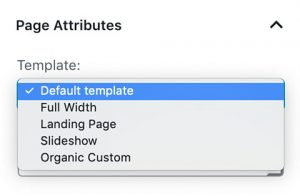
Select a template from the Page Attributes.
All Organic Themes include a variety of Page Templates. Templates are used to display content differently on a page. Some common page templates included with an Organic Theme are a blog template, portfolio template, archive template and full width template.
Each Page Template serves a unique purpose. We have outlined the purposes for some common page templates found within our themes:
Archive — Display your site archives including posts, pages and categories. Can be used as a sitemap.
Full Width — Display a full width page without any sidebars.
Blog — Display posts from a category selected within the theme options.
Portfolio — Display posts with Featured Images from a category in the theme options.
Page Templates are applied within the Page Attributes section of the page editor. Templates can also be applied within the Quick Edit options as seen below.
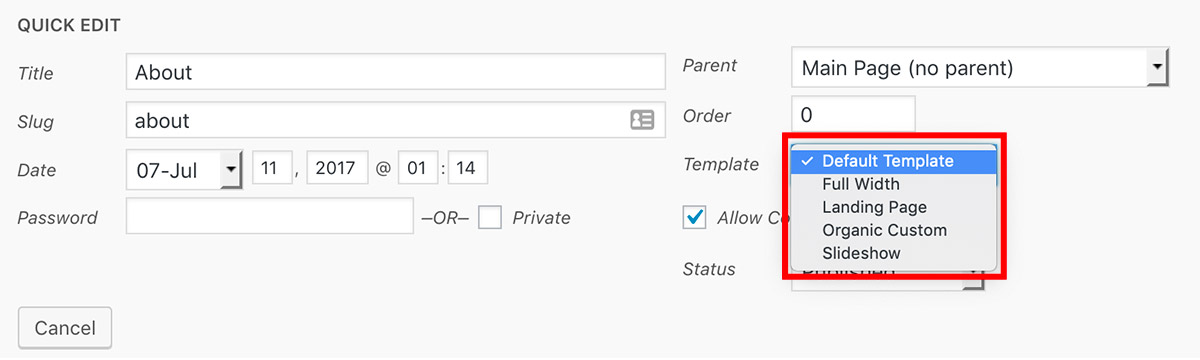
To make it easier, page templates can also be applied in the Quick Edit options.
Note: Available Page Templates do vary with each theme.
WordPress Templates | Organic Themes
I bought the structure theme and I am trying to add a template to a page.
I want it to use the portfolio template and I chose it in quick edit like its
explained here but when I click view it doesnt work, it says:
PAGE NOT FOUND
We’re sorry, but the page you’re looking for isn’t here.
Try searching for the page you are looking for or using the navigation in the header or sidebar
But if I choose full width template or archive or default template it works but the blog template or
the portolfio template are not working….. How can I fix this?
This is most likely a permalinks issue. Try re-saving your permalink structure.
I have the same problem. Re-saving permalinks didn’t fix.
I just purchased the ‘Bold’ theme today and have been browsing through the page template section and noticed that there is no ‘portfolio page’ option in the drop-down menu. So how would i go about setting up a portfolio page like the one in the demo?
There is a portfolio page template with the latest version of the Bold Theme. You can ask in the support forums if your are having difficulty setting it up.
msheanime8,
If you’re having difficulty accessing the forum of any theme you’ve purchased, you’ll need to fill out our contact form (above), and we’ll sort your forum permissions.
Thanks,
Socrates
Hi,
I have filled out that stupid form 5 times and knowone ever gets back to me so that I can access support. I am sick of it. Can you help?
Shane
Shane,
Unfortunately, we haven’t received any correspondence from you via the form, which is something we’ll look into.
If you could e-mail ‘support@organicthemes.com’ directly, we’ll be able to help.
Thanks, and my apologies for any confusion!
The forum site lists support@organicthemes.zendesk.com. as the email address which fails to send. I will email the one you printed here, but I just wanted to let you know.
-Angie
Hi Angelica,
Just to confirm I received your e-mail, but I am also able to e-mail the support address you indicated without issue (as are others). Please make sure you are entering the address properly, or if you are repeatedly experiencing problems, contact us at ‘support@organicthemes.com’ and we’ll look into it.
Thanks!
we’ re interested to make a webside with organicthemes
we’re a nonprofit company, that’s why we like the non profit template but we have a question. We want to add a webside tab, that can be used as a online shop.
we want to know if it’s possible to make it an how much it cost?
thanks!
Can I have multiple portfolio pages, or only one in the studio theme. For instance I would like.
Portfolio features all work (portfolio page 1)
Video (portolio page2)
Animation (portfolio page3)
etc
Is this possible? Thanks for your help
I am interested in this as well ……. any luck getting it done?
The Studio Theme only includes a single portfolio page template. You can duplicate the template. Instructions are provided for this process within the support forums.
Good luck with that one! Instructions? Maybe you can write code… not instructions!
Replicating a page template that contains multiple theme options and a considerable amount of code is not a simple process. You’re welcome to use our customization services if you are unable to duplicate the portfolio page template.
Hi David, I’ve been searching through support trying to find this. Can you point me to the right place? Thanks!
I have just purchased the restaurant theme and am having a hard time getting the food menu to work properly. How do I get it to display in the navigation menu as “menu” and not “appetizers”, “lunch”, etc.?
Name the page “Menu”, or you can use the custom menu, http://www.organicthemes.com/tutorial/setup-a-custom-menu/
That’s not working for me. I need my menu to work just like the Demo does. How do I do it?
how can i get a contact page template? just like here: http://organicthemes.com/demo/nonprofit/contact/
I have two questions:
The first one: i am working with a client who wants all pages on her site to be exactly like the home page template. Is this possible and how can I make other pages exactly the same as the homepage?
The second question is about hosting. My client registered her domain name with Godaddy, and it is parked there. She wants to use Godaddy as her web host, and also wants to use their shopping cart for accepting payments for her merchandise. Is it possible to use your templates and upload them to Godaddy. How can I do this? Please explain.
Hello,
Yes, the demo content can be downloaded from our support forums and installed, so the theme can appear exactly as the demo.
Yes, our themes will work fine with GoDaddy, as long as WordPress is installed on the server.
I also want to use the non-profit contact form on the natural theme….I don’t want to mess up the work already done by loading the demo – can I just select the contact page to download or is there a way to download the demo without messing up existing site?
How do i create an animation page like this http://organicthemes.com/demo/portfolio-white/animation/ ?
With the Studio theme, it would be nice to make a “private” portfolio page. However, it seems the category you choose (for the portfolio page to pull from) requires public blog posts under this category… Any way around this? Much thanks!
You would need to make each portfolio post private as well. You could try a plugin, http://wordpress.org/extend/plugins/search.php?q=private+page&sort=
Hi
I am creating a website, i.e. not a blog style website with posts. I’ve created the website pages using the Magazine ‘default’ template i.e text within main body and one right column (i.e. as per this site http://www.hbcap.com/index.php). I would like the Home page to also use this template, however it seems to be in post format. In summary, I’d like to make the Home page use the default template and make the current ‘post’ style Home page a ‘News’ page rather than the Home page. Could you please let me know how to do this.
Much appreciated
Lee
Hi,
I’m customizing a site.
I’ve tried to make the following page a 3 column page:
http://riknus.nl/index.php/category/logos/
but so far I can only adjust the page templates, not the categories.
could you tell me how to make this possible?
thnx
Gee
The default setting for categories in the Portfolio Theme is a 3 column layout. Within the Appearance > Theme Options > Portfolio Categories, make sure the 2 options are set to “No”.
Thanks you for your response.
It also means that all the categories become 3 columns.
is there a way to split this, so one 3 columns-page and two 2 columns page?
much appreciated,
Gerjo
You could accomplish this using a combination of categories and page templates. So, setting your categories to display in 3 columns, and then using a 2 column portfolio page template.
Newbie here… how do I get the large image to appear above the text as in the page examples for the Studio theme?
The example I’m looking at is: http://organicthemes.com/demo/studio/company/
Thank you!
I purchased the restaurant theme and have been adding my content. I would like to display additional food menus to my site, but it looks like the theme is restricted to one menu with 4 categories. I would like to have 3 separate menus (Breakfast, lunch, dinner) with up to 20 categories for each. I realize this requires some customization. Can I purchase this feature for an additional fee?
How can I modify a template page.. Like the blog template, so I can put my photos in.
Greetings
We can provide support for this question within our forums.
I’m using the Shop theme and the Featured Images take up a block on the page, leaving a lot of white space. I’d like to be able to use that white space for quotations. Is this possible? Thanks…. very clean templates!
I do not seem to be able to use different page templates. for example, my blog page stays the exact same, regardless of what page template I have set. Would really just like a ‘traditional’ looking blog. have no clue how to do this.
would really appreciate some guidance.
thank you,
I would recommend our support forums for guidance, http://www.organicthemes.com/support/
hello i purchased my theme(structure) yesterday the problem is the slider doesn´t work because the files are incomplete and widget video are not incluide ¿what can i do?
Hi Brenda, your site seems to be functioning properly now. I’m assuming you resolved the issues. Thanks!
How do you create a featured category page? I assume the template has to be a blog but how do I make it only display blog posts that are featured?
I want to know the same thing. I’d prefer to have my blog look like the featured tab on the demo, but I can’t figure out how that was set up. Any pointers appreciated.
Hi Guys,
Just add a category to the menu using the custom menu, http://www.organicthemes.com/tutorial/setup-a-custom-menu/. There’s not a page template for adding categories.
I’m trying to get my Magazine Theme wordpress set up but I cannot find Theme Options under Appearance…am I missing something?
Hello,
I bought the theme structure, and the default template I have an error on the page: .. / page / 2 /
PAGE NOT FOUND
We’re sorry, but the page you’re looking for is not here.
In contrast with the blog template or portfolio template work properly …
I re-saving your permalink structure, but not solved the problem
Please help me!
thanks
Sorry, don’t know if it was clear before. The error occurs in the Home page
Hi Ricard,
Under Settings –> Reading, configure the ‘Blog Posts to display’ setting to be the same as, or less than, the number of posts you’ve configured to show via your theme’s options panel.
Thanks,
Jeremy
Hi,
I’m a WordPress beginner and I thought I’ll buy a theme of Organic Themes to make it easier to start.
I bought the Portfolio Theme, installed it the way described (I installed WordPress locally with Mamp) and started working.
But I can not find anything I thought I bought. There are a few page templates, but I think they do not differ much from the templates WordPress makes available. I can not figure out how to get the homepage with the image slider and the menu (balls).
On the forum I find threads, but no install / user help.
Is there anyone who wants to give me a hint how to start with the theme?
Do I have to download more files? And is yes, where can I find them.
Thanks.
Hi Ingrid,
Please see our tutorials section on how to use page templates: http://www.organicthemes.com/tutorials/
For the homepage with the image slider, make sure your reading settings (Settings –> Reading) are set to show ‘your latest posts’. The homepage will be generated automatically (that is, no need to create a static ‘home’ page).
Thanks,
Jeremy
I purchased the portfolio theme. I installed it and it works well.
However, I can’t chose a page template (full width, blog,…) as the posts don’t show the options as shown on your sceenshot.
Can you tell me what I can do to have the ability to chose from the page templates for each post?
Many thanks for your help.
Hi Celine,
Make sure you’re looking at the page editor, not the post editor, when trying to apply a page template. You can also try checking your screen options (top right) to make sure the box beside ‘Page Templates’ is checked.
Thanks,
Jeremy
Hi, I’m interested in buying your Photographer theme, but I see on the demo etc that all the images are in landscape format. Most of my images are portrait format, is there a template page included that supports portrait or square format images? I don’t want to go to the expense of buying the template if it’s not suitable for my work, thanks!
Hi Alexandra,
The Theme is currently optimized moreso for landscape format images, with the exception of the two and three column portfolio page templates. If it were necessary for the entire theme to be portrait optimized, that would require modifying the theme (just as a heads up).
Thanks,
Jeremy
OK Jeremy, thanks for your help!
How do I customize the first page so that it looks like the advertised template? Is there any instructions that tell me what short codes to use so that i can have a 3 column or 2 column home page? Shouldn’t there be more instructions than what’s on the tutorial pages?
Feedback: The instructions on the tutorial page (while good for beginners) still does not explain how to customize this template, if there were better instructions there would be less questions on this page.
Hi nuvibemedia,
You’ll need to make sure your homepage reading setting (Settings –> Reading) is set to show ‘your latest posts’, to have the homepage display as per the demo. The columns on the homepage are configured via Appearance –> Theme Options; there is no need for short codes.
We’ll definitely take your feedback in mind, as we are looking into updating the tutorials.
Thanks,
Jeremy
Hi
I am using the structure theme an would like to use the portfolio page twice for two separate categories . is this possible. Right now in theme appearance i can only ascribe one category to the portfolio page and use it once.
Thanks
Keke
Keke,
It is possible, yes, through creating additional page templates. Please see here: https://organicthemes.zendesk.com/entries/22148543-creating-additional-page-templates
Thanks!
I am using the Restaurant Theme and I want to basically use the Food Menu template page as a list of items related to our blog that can be purchased from other websites (amazon, etc.). I want to add “food menu items” with the thumbnails and descriptions, as it already allows, but then have a hyperlink in the description or make the thumbnail a clickable picture that takes you to another site. There doesn’t seem to be a button to add a hyperlink to the description so currently we just have the link in plain text in the description. Not a hyperlink.
Could you help? Thanks!
Angie,
Adding a link requires customizing the food menu template itself. If you needed help with such a customization, I recommend contacting Werkpress: http://www.organicthemes.com/customization.
Thanks,
Jeremy
Okie doke. I ended up getting a plug in that allows me to add html/code into the excerpt and got it to work.
Thanks!
Hello,
I have jsut bought the structure theme and I’m so far loving it. It’s simple, stylish and easy to use. Just one question… in the demo there is a page template used for Featured articles page which is not present in my template. Can you tell me how can i get it? thanks a lot
Hi Bilyana,
The ‘Featured’ page is a category that has been added to the navigation menu, via Appearance –> Menus.
Thanks!
Hi Jeremy,
thanks for yuor quick reply and help.
of course, thanks a lot. I didn’t realise, now it’s perfect.
Best regards
Bilyana
Hello J,
I’m working with the Block Theme. The font in the slider is white. Legibility is challenged when the photo is of a light value. How may I add a tint behind the text or drop shadow to the text itself? FYI I have no experience with CSS or HTML but am a great student.
Thanks!
Sharon
How do I remove the featured image from the default template if I don’t want it to show on the detail page but I want it to show on the featured section of the homepage? Similar to how you have set up in the demo.
Hi
I’m having problems creating a Blog page in the photographer theme…
I have 9 posts but the page never loads!
How can I solve this?
I create a Page, with the blog template… do I have to do anything else?
Thanks
My page is http://www.camilamfotografia.com.br
Hi Camila,
Please send support requests to http://www.organicthemes.com/support, as this isn’t really the best place for support (these comments are only lightly monitored).
Thanks!
Please help me.
I am having such a hard time. I want to use the Photographer Organic Theme I purchased for my site. I have no idea what I am doing. This is so hard. I thought I would just be able to double click things and insert my text, photos and such. Instead, there is so much work and I don’t know how to do anything.
You have an entire page dedicated to how to add a feature image and non of it makes any sense!?!
“Within the Post or Page Editor of the WordPress admin, scroll down to the “Featured Image” section in the right column. If for some reason it’s not visible, make sure you have “Featured Images” checked within your WordPress Screen Options.” – Not any of this description even exist. I went to theme options and checked the box that says “Displays featured images on the posts page.” I have no idea where the WordPress Screen Options page is. This is so hard.
When you buy one of the Theme packages does it actually put out some type of template somewhere?!? I wish this worked like an InDesign template that you could just point, click and edit certain things like text and photos. What am I doing wrong!?
Hi Chapin,
If you could please submit a support ticket: http://www.organicthemes.com/support, we would be glad to help you work through using the theme
Thanks!
I am using your Restaurant Theme v3. The slider allows you to display Blog posts, but I need to display pages on it. Is there a way to do that ?.
Thanks
Hi Nippur,
Without modifying the theme, you could use the ‘Page Links To’ plugin to re-direct slider posts to pages.
Thanks!
Fantastic site. Lots of useful information here. I am sending it to several buddies ans additionally sharing in delicious.
And naturally, thank you on your sweat!